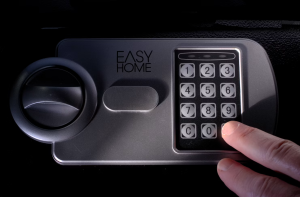
Two safes. Same steel, same size, same price. One has a keypad. One has a dial.
People often assume the digital one is “the modern secure option” and the dial is “the old one from the movies”. Neither is true. They’re both proven. They just fail in different ways, and that’s the real question: when this thing gives you trouble one day, what kind of trouble would you rather have?
Let’s break it down.
Mechanical safes: the dial
A mechanical lock uses a stack of precisely machined wheels inside the door. Line them up in the right order and the bolt releases. No power, no chips, no software. The design has been securing safes for well over a century.
Pros
- No batteries. Ever. It can’t go flat at 11pm on a public holiday.
- Very long life. A well-maintained dial lock can run for decades, often longer than the person who bought it.
- Nothing to short out. Heat, humidity and power surges don’t bother it. Handy in a damp garage or a coastal Sydney home.
- Fewer parts, fewer failure points.
Cons
- Slow to open. Thirty seconds on a good day. Longer if your hands are cold or shaking.
- No second chances. Overshoot a number and you start again from scratch.
- You can’t change the code yourself. It needs a locksmith with a change key.
- It can drift. After years of use the wheels wear slightly and your combination lands half a number off. That’s a warning sign, not a quirk. Get it serviced before it locks you out.
- One code only. Everyone who needs access shares it.
Best for: valuables you access occasionally, homes without reliable maintenance habits, damp or remote locations, and anyone who wants the least possible technology between them and their belongings.
Digital safes: the keypad
An electronic lock reads your code, then a small motor or solenoid releases the bolt. Power comes from batteries, usually inside the door or behind the keypad.
Pros
- Fast. A few seconds. That matters if you use the safe daily.
- Change the code yourself, as often as you like. Great when staff or housemates change.
- Multiple user codes. Everyone gets their own.
- Audit trail on business models. You can see who opened the safe and when. This is genuinely useful when reconciling a till.
- Extra features. Time delay locks (the safe makes you wait several minutes before opening, which discourages hold-ups), lockout penalties after wrong entries, and backlit keypads for dark cupboards.
Cons
- Batteries. Most last one to two years and give you a warning beep or light first. Most people ignore it. Don’t be like most people.
- More parts that can fail. Keypad, circuit board, solenoid, wiring.
- Humidity and heat are harder on electronics than on wheels. Worth thinking about in a garage, a beach house or an unairconditioned storeroom.
- Long-term parts supply. A 20-year-old electronic lock may be harder to source parts for than a 20-year-old dial.
Best for: daily-use safes, businesses with several staff, shopfronts, anyone who wants access in seconds, and households that will actually replace a battery when the beep starts.
The myth worth busting: “if the battery dies, I’m locked out forever”
You’re not. Two things you should know:
- Your code lives in the lock, not the battery. It’s stored in non-volatile memory. Changing the battery will not erase it.
- Most digital failures are the keypad, not the lock inside. A keypad can usually be replaced without drilling the safe at all.
If the fault is deeper, such as a dead solenoid or a failed board, that’s when a safe locksmith opens the safe properly and repairs it. Still fixable. Just not a five-minute job.
What about biometric safes?
Fingerprint readers are quick and there’s no code to forget. They’re popular for bedside and firearm safes where seconds count.
Our honest take: treat the fingerprint as the convenient way in, and the backup code or key override as the real way in. Sensors can struggle with wet, cold, dusty or cut fingertips. Always test the backup method when the safe is installed, and again once a year, so you’re not learning it works for the first time in an emergency.
So which should you buy?
Ask yourself three questions:
- How often will I open it? Daily → digital. A few times a year → mechanical.
- How many people need access? More than one, with different codes → digital.
- Will I maintain it? Honestly. If a beeping battery would go ignored for months, the dial is your friend.
There’s no wrong answer here. There’s only the one that suits how you actually live and work.
Not sure? Ask someone who fixes both
All Time Locksmiths repairs, services and opens both types across Sydney, every day of the year. We’ll tell you what tends to fail, what’s worth spending on, and what isn’t.
Call 1300 705 307
We’re always open! 24 hours a day, 7 days a week.